Andrew InnesChief Architect
Jun 1, 2026 | Read time 6 min
The Adobe story: How we made cloud-grade AI work on your laptop
Behind the build: what it takes to make cloud-grade speech recognition work inside Adobe Premiere, and why Whisper raised the stakes.
Please indulge me: I’ve waited five years for the opportunity to tell the world about our achievements in becoming – and remaining – a core part of Adobe’s hugely popular video editing product, Premiere. There’s a lot of ground to cover.
In late 2020 Adobe was pressing ahead with an ambitious vision for transcript-driven video editing that promised to transform the productivity of this burgeoning task. They were already locked into a 2021 launch date with another STT vendor who would deliver a library for in-app transcription on macOS and Windows.
Astonishingly, our chief sales maestro had persuaded them to give us a chance to impress at the 11th hour. They were satisfied our cloud product had the highest accuracy, but could we make it work on macOS and Windows and meet all of their integration requirements?
Answering that question convincingly took months of the toughest negotiations I’ve ever faced, with the immovable launch date getting ever closer. The negotiations were ultimately about two things: proving to Adobe that we could deliver on time, while ensuring we didn’t derail our own ambitious innovation plans.
Spoiler alert: we succeeded on both fronts. Fast-forward to 2025 and a new gauntlet was thrown down: beat Whisper to remain relevant. Those ambitious innovation plans from 2021 were the key to winning again.
I've put together a two-blog series exploring how we did it the first time, and then did it again. Read on for part one.
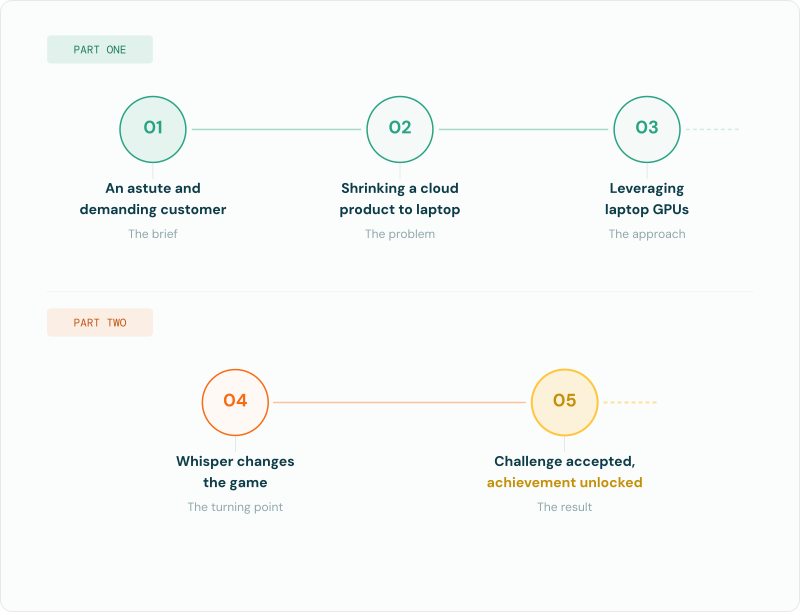
From 4GB to 1GB: shrinking a cloud speech model for Adobe Premiere
Adobe is famous for dominating multiple global businesses, reinventing and uplevelling their tech and products to stay relevant for more than 40 years as Desktop Publishing became a thing and then faced the onslaught of successive Internet waves. Today a product like Premiere is as relevant as ever as video content production has exploded astronomically. It has stayed relevant by constantly pushing forward on technical capabilities, including the use of Machine Learning models for manipulating video, images, audio and text.
This makes the Adobe engineering team adept at understanding ML components and how to integrate dozens, perhaps hundreds, of ML models into a sophisticated program that is a workhorse for millions of creative industry professionals.
Keeping Premiere responsive and fluid even on the minimum spec hardware is something that Adobe takes very seriously – so much so that their min-spec requirements are now permanently inscribed on my brain.
In a nutshell, Adobe needed our STT library to run using a fraction of the resources of a min-spec machine, with the ability to be instantly paused and resumed, while delivering best-in-class transcript accuracy including professional formatting of numbers, dates, addresses, brand names and more, with lip-synch accuracy for word timings. The aim is to minimize the amount of post-transcription editing work falling to the customer – a metric that is closely monitored by Adobe.
A critical technical requirement Adobe imposed at the outset is complete control over model loading and inference. With Premiere juggling dozens of models running background tasks, precise control is essential to free the GPU in milliseconds when the user presses play to see their latest edits.
A final requirement was hardware compatibility – Premiere runs on millions of machines of many different vintages and is expected to work flawlessly. At this scale, you have to be prepared to deal with bugs even in the PC hardware itself!
Shrinking a cloud product to run on laptops
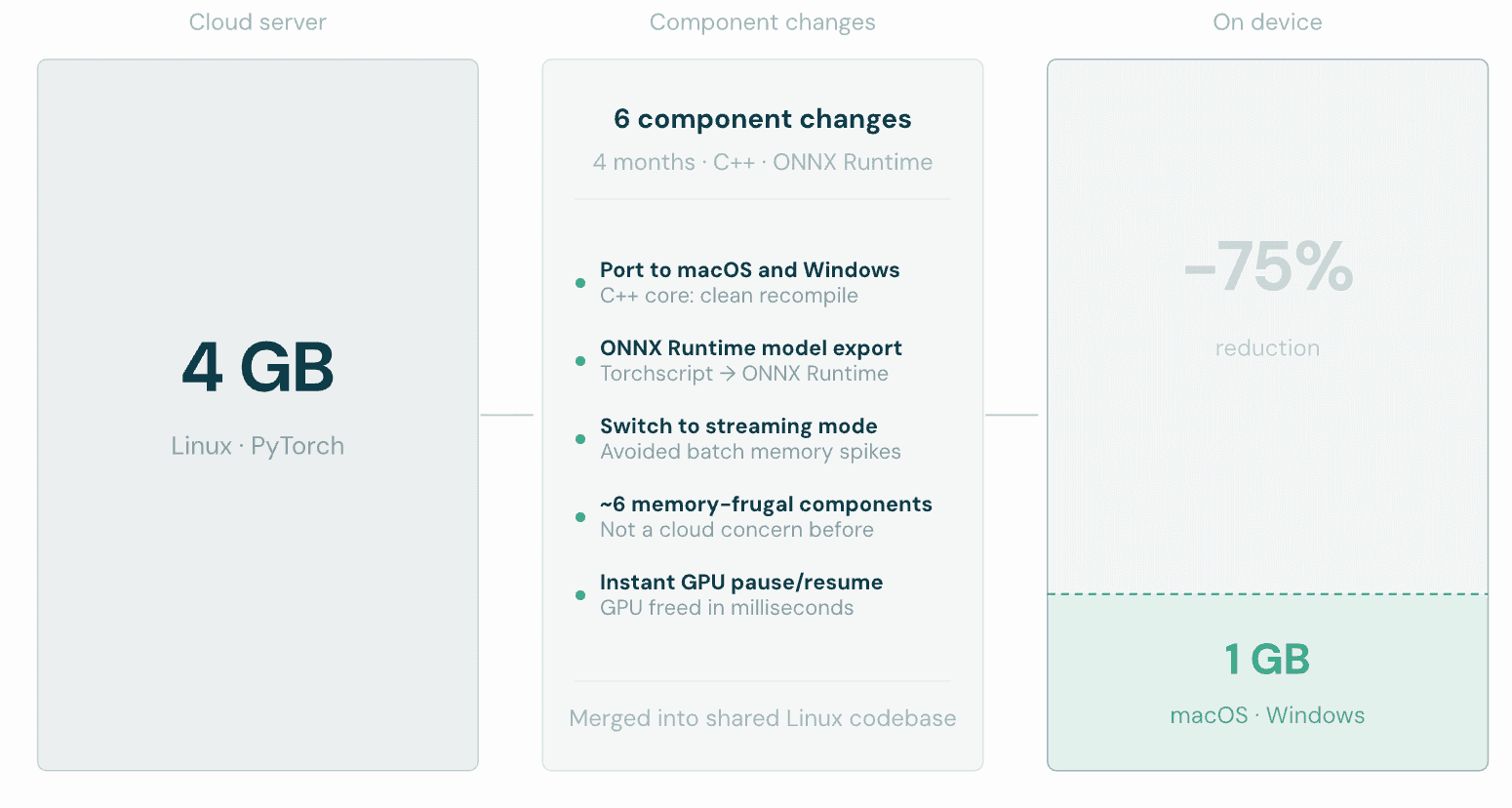
Our biggest technical challenge in 2021 was that we were starting with a Linux product designed to run on cloud servers; we needed to both port it to macOS and Windows and shrink its memory use by 75% (to 1GB instead of the 4GB available in cloud). Disk footprint was equally important; Adobe’s customers would see the download and storage cost of each language pack they selected.
Porting turned out to be the easy bit, as the core of the product was plain C++ code that recompiled easily on different platforms. Reducing the memory footprint was trickier, though possible because it had simply never been a concern before. In the end, about half a dozen component changes were needed to switch to memory-frugal approaches.
Re-exporting all of our models to use the ONNX Runtime in Premiere itself helped, and switching our engine internally to work in streaming mode (intended for realtime operation) avoided big memory spikes seen in batch mode. Thankfully, our engine and models had been designed from the start to support both modes, and the accuracy differences were minimal.
To help minimize differences from our cloud server product, we incorporated most of the changes into the common code shared with the Linux products. It meant dealing with some painful consequences of having to export models to ONNX format, rather than just running our PyTorch models using Torchscript with all the convenience that offers.
Although it was a very intense experience we hope not to repeat, we were able to achieve an acceptable footprint (along with all of the other accuracy and formatting criteria) despite having a development phase of only four months from contract signature to final acceptance.
Adobe told us later they were astonished that we managed to deliver on time; they had assumed we would overrun significantly.
Leveraging laptop GPUs
One part of Adobe’s ideal requirements hadn’t made the cut for initial delivery, but was still top of their wish list: the ability to use the GPU (or the Neural Engine on M-class Macs) for STT model inference. The expectation is that GPU inference will improve throughput and offload work from the CPU, making it easier for other parts of Premiere to have the CPU power they need to keep the application responsive and fluid.
We agreed to take on this second challenge, not appreciating at first just how difficult it would be. I remember vividly the first time I tried “just turning on the GPU option” in the ONNX Runtime, to discover the model ran significantly slower than on CPU (while using a ton of extra memory). On macOS, my recollection is that export to the CoreML framework didn’t work at all.
In hindsight, I see now this was a foretaste of what was to come.
The details of eventually getting there are boring but instructive: it took about a year of chasing Adobe’s hardware and software partners to get various enhancements and bug fixes into the ML inference frameworks and GPU drivers that Adobe uses on both platforms. Even once the models were able to export and run without errors or crashes, it took weeks to tweak our models to avoid the dreaded condition of CPU fallback – where a step in the model won’t run on GPU and has to switch to CPU and back again, tanking performance.
The lesson: audio is not the same as images or text when it comes to ML models. A framework may work great for optimizing image processing models say (one of the earliest success stories for ML), but fail miserably for models that work a bit differently.
It turns out that the corollary to this lesson holds true even now: it takes hard work to get state of the art results for STT models, seemingly on every different platform we try.
Stay tuned for part two: Better than Whisper: how Adobe Premiere's on-device speech engine got rebuilt dropping on June 3rd 2026.
Related Articles
- CompanyApr 21, 2026
Adobe and Speechmatics deliver cloud-grade speech recognition on-device for Premiere
 SpeechmaticsEditorial Team
 - TechnicalMar 31, 2026
Speech-to-text in production: what 36 years of hard lessons taught me
 Dr Tony RobinsonFounder
 - TechnicalMay 20, 2025
The return of on-premise: Why enterprise AI's head is no longer in the cloud
 Brad PhippsDirector, SaaS & Infrastructure

General
How Medical Transcription Supports Clinician Productivity
SpeechmaticsEditorial Team
![[alt: Healthcare is a strain image]](/_next/image?url=https%3A%2F%2Fimages.ctfassets.net%2Fyze1aysi0225%2F4YLB294PotEnVZFTtksUt8%2F0f9e81fbe24027f52d1941713e032217%2Fmedical_blog_header_general_01.webp&w=3840&q=75)
Use Cases
Healthcare is feeling the strain. Multilingual AI can be the answer.
Paolina WhiteSenior Director, Strategic Accounts

Technical
On-device speech-to-text, in 10 questions
Stuart WoodDirector, Product

General
How Law Firms Can Reduce Deposition Costs with AI Transcription
SpeechmaticsEditorial Team

Product
Scale more easily with Speechmatics
SpeechmaticsEditorial Team

General
What Makes a Voice Agent Sound Natural?
SpeechmaticsEditorial Team