SpeechmaticsEditorial Team

Micro-batching sits between real time stream processing and full batch processing. Think of it as the middle child of transcription modes. Not as flashy as real time, not as thorough as full batch, but often exactly what the job needs.
A user splits an audio stream into chunks (either fixed windows or cut on voice activity), submits each as its own REST job, and assembles the result downstream.
The user sees a transcript a few seconds after they stop talking, rather than word by word as they speak. It borrows the stateless integration of Batch and targets the low-latency feedback loop of real time, achieving neither in full by design. The result is a UX that feels close enough to live for workflows that do not strictly need it.
At Speechmatics, we see micro-batching most often in medical scribe applications and voice-agent post-call summary pipelines.
Three things tend to be true: networks are unreliable, the audio data already arrives in pieces, and no one needs a transcription scrolling past during the call.
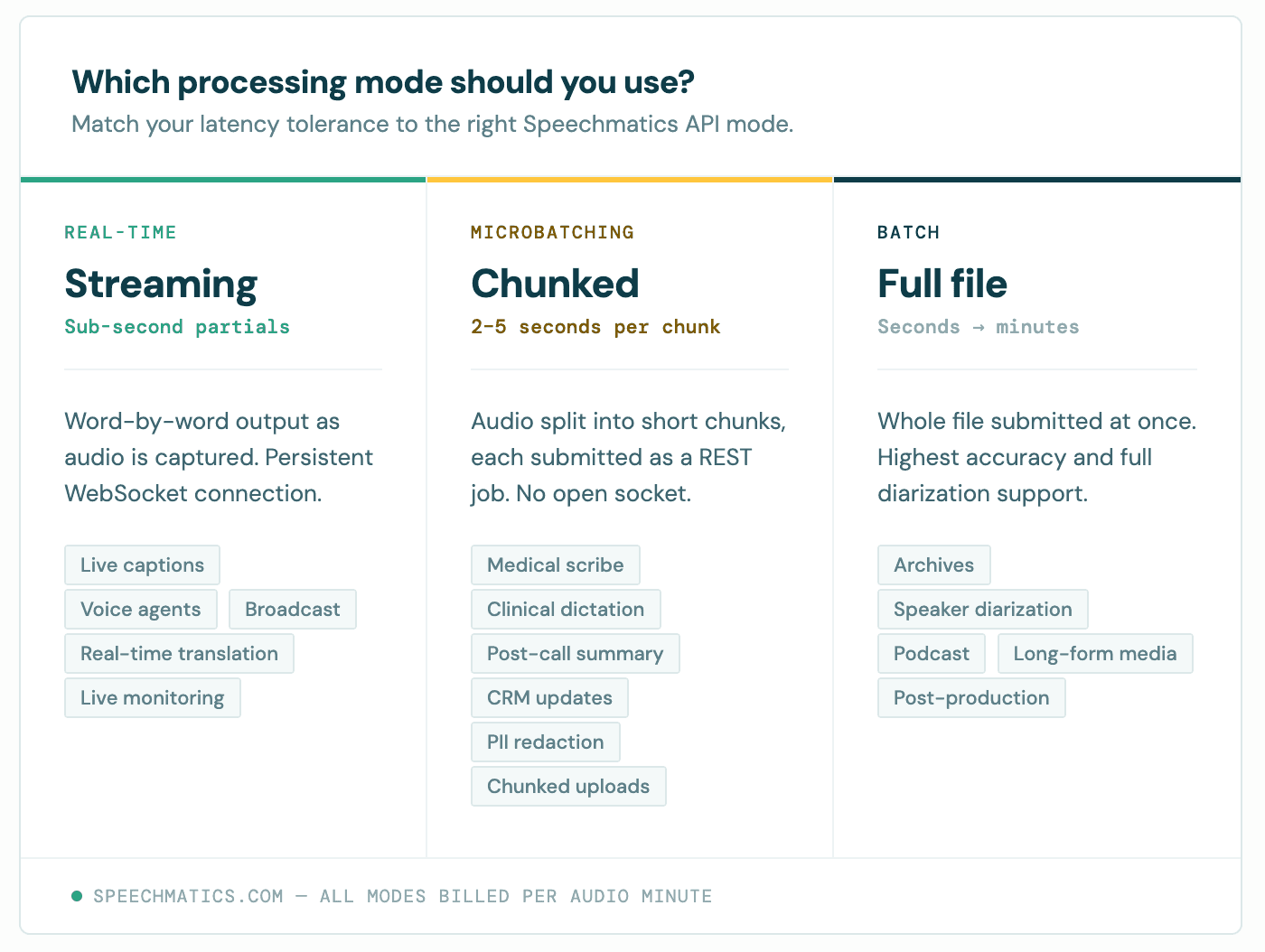
The decision rests on latency tolerance and how the audio arrives. The shape of the workload picks the mode for you, more often than the other way around.
Micro-batching fits when audio arrives in chunks and your latency tolerance is a few seconds. Real time stream processing is the right answer when you need sub-second word-by-word output for live captioning or a voice agent. Full batch processing wins when latency does not matter and you want the highest accuracy per dollar; the model gets full-file context, including for diarization.
You need two things before any code: a Speechmatics API key and an SDK.
Generate an API key in the Speechmatics Portal and store it as an environment variable. Never hardcode an API key in source. Our SDKs read SPEECHMATICS_API_KEY by default.
For the SDK, install the Python SDK or the Node SDK. Both wrap the REST batch API and parse the JSON response into typed data objects. Raw HTTP works too; every example in this post maps cleanly to a curl POST. Node 18+ or Python 3.9+ is sufficient.
The optimal input format is 16-bit 16 kHz mono WAV. It minimizes encoding overhead on small audio chunks and keeps file processing fast. Other formats are transcoded server-side, but doing the encoding upfront shaves a little off the round trip.
Chunk size is the most important design choice in any micro-batching pipeline. Here's where most people go wrong the first time: too small and the model loses context, accuracy drops at the boundaries, and you pay HTTP overhead on every request (which also creates a noisy load profile against the API and degrades the throughput you see in practice). Too large and the latency floor rises past what your users will accept.
Our own benchmarking and customer deployments converge on the same answer: 25 to 35 seconds is the sweet spot*. Yes, we know everyone wants to push it smaller, but going much smaller pays diminishing returns on latency while hurting throughput; going much larger sacrifices the responsive feel that drove you to micro-batching in the first place.
There are two ways to split an audio stream. Fixed windows are simple and predictable, but they sometimes cut mid-word and the first words of each chunk are slightly less accurate because the model has lost context. Voice activity detection cuts on silence, avoids mid-word splits, and wastes no quota on dead air. It costs more stream processing complexity, but we've made the pattern easier than it used to be: there's a worked Python example in the Speechmatics GitHub Academy, plus a speaker ID variant that shows how to preserve speaker labels across chunk boundaries.
For example, a fixed-window approach with 200 to 500 ms of overlap and de-duplication at the boundary is a sensible default.
Create the client once and reuse it. Spinning up a fresh client per chunk wastes connection setup and counts against your concurrency budget. The Python SDK exposes an AsyncClient you can await to submit and wait for completion in a single call. Reusing one await client keeps batch processing efficient.
The snippet below mirrors the structure of simple-microbatch/main.py in the Speechmatics Academy: a global TranscriptionConfig using the OperatingPoint enum, a submit_chunk helper that fires each chunk into an asyncio.create_task, and gather(..., return_exceptions=True) so one failed chunk does not bring down the run.
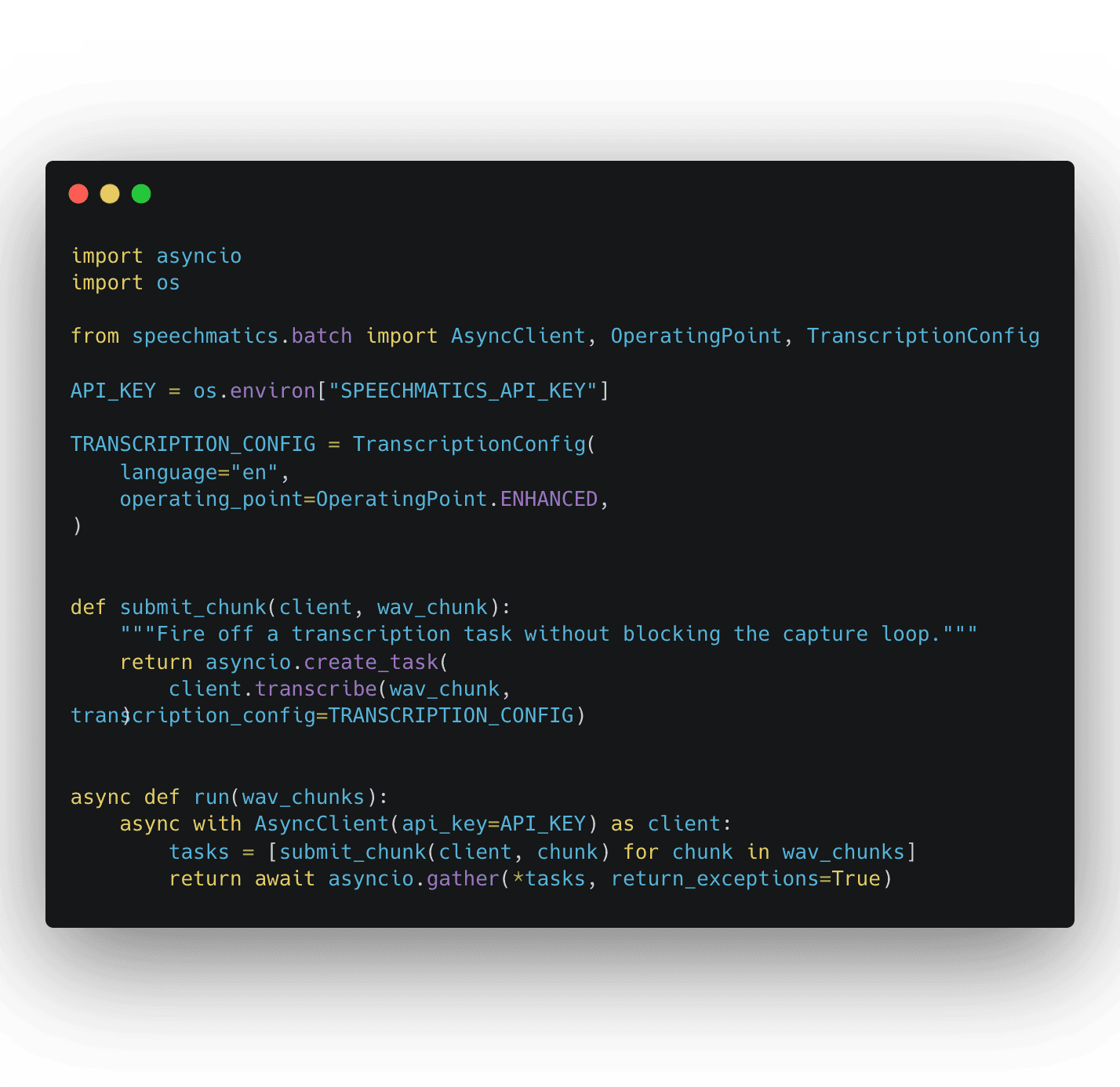
async with ensures the client closes cleanly. asyncio.gather runs every batch in parallel, so throttle to 10 submissions per second to stay inside the API rate limit. The same example translates directly to Node: build the client once, use it inside an async function, await each submission.
Each completed transcription job returns structured data: word-level timestamps, confidence scores, speaker labels. The Speechmatics API can also output the transcript as TXT or SRT without reprocessing the audio file, useful when one downstream system wants structured data and another wants captions.
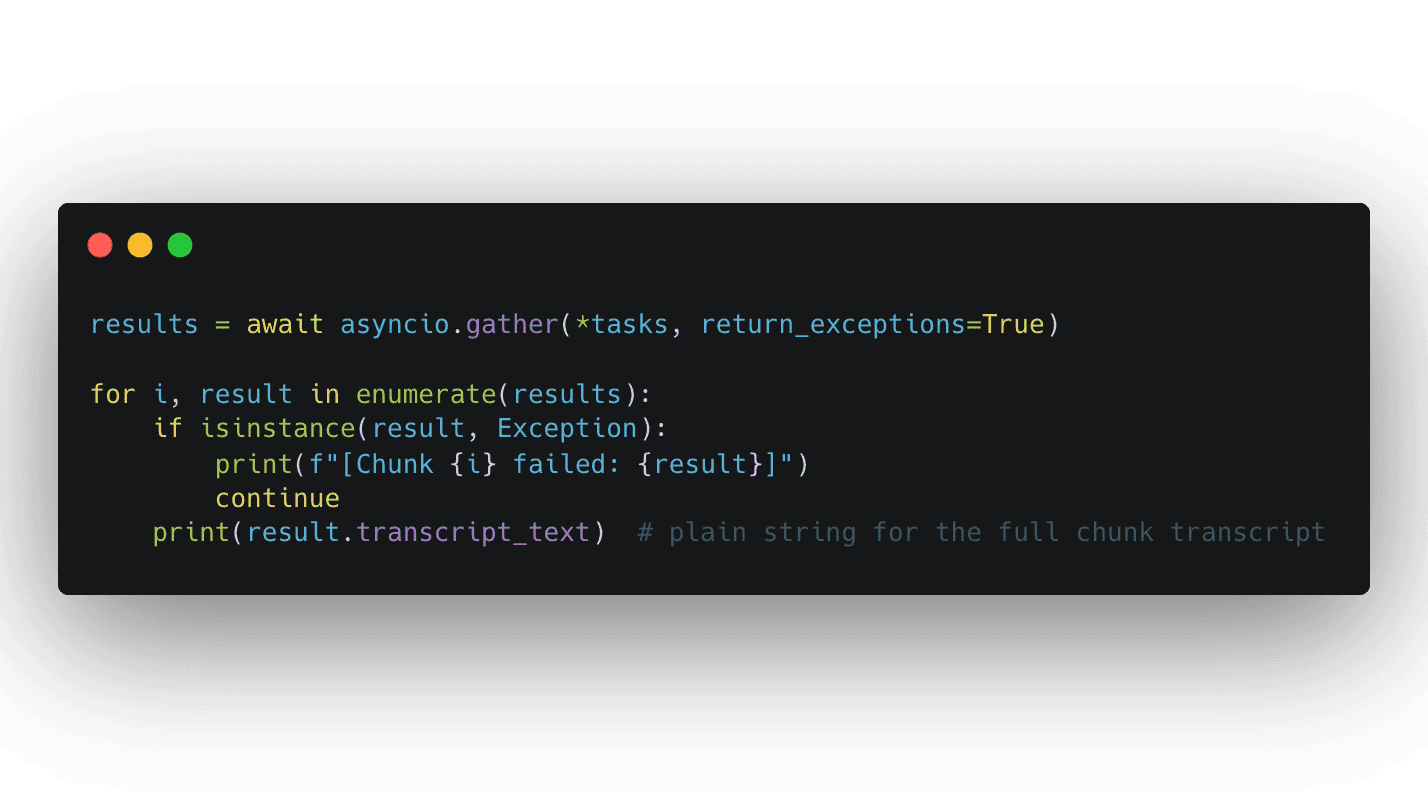
For most micro-batching workflows you do not need to touch the raw JSON. Our Speechmatics academy example stitches results back together with result.transcript_text and asyncio.gather. The pattern looks like this:
Each result also exposes the structured response (word-level timestamps, confidence scores, speaker labels) when you need it, plus TXT and SRT outputs without reprocessing the audio. Validate the schema before passing data downstream: models change, fields get added, and a defensive consumer keeps your pipeline stable across releases.
Three classes of error matter in production: transient failures to retry, fatal errors to surface immediately, and silent duplicates that quietly inflate your bill. The Speechmatics API rate limit on POST /v2/jobs is 10 jobs per second. Exceeding it returns HTTP 429.
Handle transient errors (429, 503, network timeouts) with exponential backoff and jitter, and cap the retry budget so a sick downstream does not turn into a queue backup. Treat 401 and 403 as fatal: a bad API key is not a network problem.
Generate your own job ID before submission so retries can check whether a job already exists rather than blindly creating a duplicate. Without that check, every timeout becomes a coin flip on whether you just paid twice for the same audio.
At scale, use the batch notifications webhook instead of polling. Speechmatics POSTs the result when the job finishes, removing almost all status request load and keeping you clear of the 50 GET requests per second ceiling.
Three use cases dominate in production today. They share a shape: chunked audio data, latency tolerance of seconds rather than milliseconds, and one stateless integration that runs the same in cloud and on-prem.
Medical scribe and clinical dictation. The dominant micro-batching use case. A clinician finishes a consultation, the application chunks the recording into 30 to 60 second pieces with voice activity detection, and the transcription lands within seconds for review and structured data extraction. A dropped Wi-Fi connection mid-consultation does not lose the session: one chunk fails, the client retries that chunk, the rest is intact. Sully, Heidi, IVC and DocBuddy run this pattern.
Voice-agent post-call summaries. During the call, the application captures fixed 25 to 35 second chunks of audio and submits them in parallel as each window closes. By the time the customer hangs up, the transcript is assembled and ready to feed the summary, the action items, and the CRM update.
Compliance bulk redaction. Audio archives are processed in micro-batches with PII detection. Flagged segments route for human review; clean audio is archived. Micro-batching gives you parallelism and per-chunk audit trails (job ID, timestamp, API key) without streaming complexity. For regulated data, the per-chunk record is often easier to defend in an audit than a monolithic job.
At scale the constraints come from rate limits, not the model. Plan around the numbers below, harden the security perimeter, and the rest is operational hygiene.
Throttle submissions with a semaphore and scale workers on queue depth, not CPU. CPU containers are sufficient for this client-side processing: you are buffering audio data and parsing JSON, not running models.
Encrypt audio data in transit and at rest. For regulated data such as healthcare or finance, the on-prem batch processing container exposes the same API as SaaS, so the example code runs unchanged inside your own boundary. One integration that works in the cloud or behind a firewall is one of the strongest reasons regulated customers choose micro-batching.
Track end-to-end latency, success rate, queue depth, and 429 count. Log batch IDs with every error to find the specific job and audio file behind a failure. A rising 429 rate is the earliest signal you are submitting too aggressively.
What is micro-batching? Micro-batching is the practice of collecting data in small groups for processing. In speech-to-text, that means splitting an audio stream into short chunks, submitting each as a batch transcription job, and assembling the response downstream.
How is it different from real time stream processing? Real time returns partials in milliseconds as audio is captured. Micro-batching returns a transcript per chunk, with a latency floor equal to chunk duration plus processing time. Real time wins for live UX; micro-batching wins when you can absorb a few seconds and want a simpler integration.
What is the optimal chunk size? 25 to 35 seconds for most applications. Going much smaller pays diminishing returns on latency while inflating HTTP overhead and load; going much above 35 starts to push the latency floor past what most live-feeling workflows can absorb.
What is the rate limit? 10 new jobs per second on POST, a recommended 50 status requests per second on GET, and up to 20,000 concurrent jobs in flight. Exceeding the rate limits returns HTTP 429.
Does micro-batching cost more than batch? No. Speechmatics charges per audio minute, not per request. Twelve 5-second chunks cost the same as one 60-second file.
Can I run it alongside real time transcription? Yes, and most production systems do. Normalise the JSON response shape at the edge so downstream consumers do not need to know which mode produced it.
Get an API key, open the batch quickstart, and submit your first job. The batch limits reference is the page to live in while you tune concurrency. For a runnable end-to-end pattern, start with the micro-batching use case in the Speechmatics GitHub Academy and add the speaker ID variant when you need labels preserved across chunk boundaries.
If you find yourself fighting chunk boundaries (mangled words across cuts, diarization resets ruining speaker labels), look at real time streaming. Micro-batching solves a specific problem; pick it deliberately, not by default.





![[alt: Healthcare is a strain image]](/_next/image?url=https%3A%2F%2Fimages.ctfassets.net%2Fyze1aysi0225%2F4YLB294PotEnVZFTtksUt8%2F0f9e81fbe24027f52d1941713e032217%2Fmedical_blog_header_general_01.webp&w=3840&q=75)




![[alt: Dark teal banner for Agent STT, with a cyan audio-wave logo and text: “Speech-to-text purpose built for voice agents.”]](/_next/image?url=https%3A%2F%2Fimages.ctfassets.net%2Fyze1aysi0225%2F2dxy1TDbcnumiCFjG02CW7%2Fa6efeb049451db1e3339f839259fa16c%2Fagent-stt-blog-800x500.webp&w=3840&q=75)