
Archie McMullanSpeechmatics Graduate
In the world of voice agents, the "awkward silence" is the enemy.
We all know the feeling. You finish asking a voice assistant a question.
And then you wait.
…
That gap…
Between you finishing your sentence…
And the AI responding…
Is where the magic of conversational AI lives or dies.
For us at Speechmatics, solving this isn't just about raw processing speed (though we have that). It’s having the confidence in when to send you the finals.
We are introducing Forced End of Utterance (FEOU) to let you tell us when you want them.
The philosophy is simple: If you are happy that speech is over, then so are we.
To understand why this feature matters, we have to look at how transcription works under the hood. Real-time transcription engines typically output two things:
Partials: Low-latency, evolving best guesses of what is being said. (e.g., "I want two...")
Finals: Highest-confidence, punctuated, stable text. (e.g., "I want to go to the park.")
Most systems (voice agents, scribes, etc.) wait for the accurate "Finals" before spending LLM tokens with text that could continue to update. The problem? To generate "Finals", standard engines hold back for a fixed period of silence to ensure the user has truly finished speaking.
Traditionally, the engine plays it safe. It waits for a preset amount of silence or a "Max Delay" timer to expire before locking in the text. It needs to ensure that the silence after "Two..." isn't just a pause before "...hundred."
For captioning, this ensures the highest accuracy. For a conversational voice agent, that buffer feels like an eternity.
With the new ForceEndOfUtterance message, we have decoupled "Turn Detection" from "Transcription”. Your client can send a ForceEndOfUtterance message at the right moment forcing the current segment to close and immediately emitting a final transcript - ready to be passed straight to the LLM.
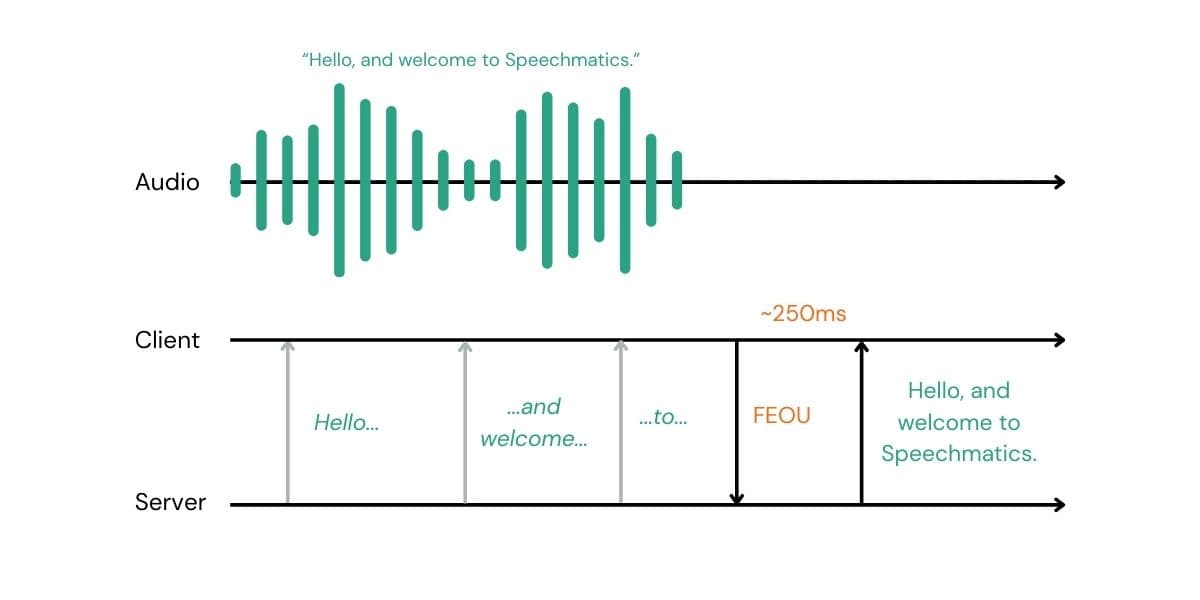
If you have a Voice Activity Detector (VAD), a "Push-to-Talk" button, or a sophisticated multimodal model that predicts when a user has finished speaking, you can now immediately signal our engine.
When we receive an FEOU message, we stop waiting. We immediately process all the audio in our buffer, apply punctuation, finalize the transcript, and send it back to you.
With this release, you now have three distinct levers to pull to optimize your agent's responsiveness:
This is the new power feature. You send a JSON message to the websocket, and we finalize immediately.
Best for: Sophisticated voice agents using client-side VAD, push-to-talk interfaces whatever you can dream up.
Benefit: Lowest possible latency. You define the rules.~
This is a server-side setting. You tell us: "If you hear X milliseconds without speech, send an EndOfUtterance (EOU) message."
Best for: A backup to ensure turns are eventually closed if the client-side signal fails.
Recommendation: Keep this lower than max_delay (e.g., 0.5s - 0.8s).
The classic setting. A consistent delay before finalizing transcription; the longer it is the more audio context the engine is given before having to finalize.
Best for: Ensuring text eventually appears on screen during long monologues or dictation.
Recommendation: 1s - 2s for conversational agents.
The easiest way to start bringing your end-of-turn latency down is to use our new Python Voice SDK. It brings together loads of helpful features for voice AI. It can handle the entire turn detection pipeline for you. It includes the open source Silero voice activity detector and the Pipecat turn detection model (Smart Turn V3) to detect an end of turn and send the FEOU message.
Alternatively, in both our real-time (RT) and Voice SDKs, you can use your own logic to finalize using:
This will send back an EndOfUtterance message. For a complete, runnable example of how to implement this logic, check out our Voice Agent Turn Detection tutorial on GitHub.
Our new Pipecat integration and upcoming LiveKit update out of the box will use their internal turn detection to automatically trigger the finalization for you.
Start building now with our integration section in the Speechmatics academy.
250ms: The New Standard for Finals
From the moment your client sends the ForceEndOfUtterance signal, you can expect to receive a final transcript in approximately 250ms (network dependent).
To understand why this is significant, we need to look at the total latency equation.
The Old Equation (Standard Engines) In a traditional cloud STT setup, you are at the mercy of the server’s safety settings.
Most engines enforce a silence buffer of 700ms–1000ms. You pay this "waiting tax" on every single turn to ensure accuracy, regardless of the context.
The New Equation (FEOU) With FEOU, we remove the server-side wait entirely.
This puts the latency budget entirely in your hands.
Your Turn Detection: You decide the logic. VAD or Smart Turn: You can even send us the signal pre-emptively, so that once the turn is complete the transcript is ready.
Push-to-Talk: If you use a hardware button, this is effectively 0ms. The moment the user releases the button, we begin finalization.
Our Processing: We handle the heavy lifting of finalizing text and formatting punctuation in that ~250ms window.
Don’t wait to reduce your latency.
By using ForceEndOfUtterance, you get the best of both worlds: the unparalleled accuracy of Speechmatics' transcription, with the snappy, real-time responsiveness required for modern voice agents. Try it out for yourself in the Speechmatics Academy.
If your system is confident the user is done, don't wait for us.
Force the finals.




![[alt: Healthcare is a strain image]](/_next/image?url=https%3A%2F%2Fimages.ctfassets.net%2Fyze1aysi0225%2F4YLB294PotEnVZFTtksUt8%2F0f9e81fbe24027f52d1941713e032217%2Fmedical_blog_header_general_01.webp&w=3840&q=75)




![[alt: Dark teal banner for Agent STT, with a cyan audio-wave logo and text: “Speech-to-text purpose built for voice agents.”]](/_next/image?url=https%3A%2F%2Fimages.ctfassets.net%2Fyze1aysi0225%2F2dxy1TDbcnumiCFjG02CW7%2Fa6efeb049451db1e3339f839259fa16c%2Fagent-stt-blog-800x500.webp&w=3840&q=75)