Tom YoungDigital Specialist
Updated: Mar 23, 2026 | Read time 6 min
Closed Captioning vs Open Captioning in Media Distribution
Open and closed captions serve different audiences and use cases. Here's what broadcasters and media distributors need to know — including compliance requirements and how speech-to-text technology makes both faster and more accurate.
What is the difference between open and closed captioning?
Open captions are permanently embedded into the video and cannot be turned off by the viewer. Closed captions are stored separately from the video and can be enabled or disabled by the viewer at will. Both display text representations of spoken dialogue and audio cues, but they serve different use cases: closed captions are the industry standard for broadcast television, streaming platforms, and regulated media distribution, while open captions are common in cinemas, public displays, and social media video.
When to use open captions vs closed captions
The choice between open and closed captions isn't always obvious. Here's a practical guide for the most common broadcast and distribution scenarios.
Use closed captions when:
You are distributing content on broadcast television, streaming platforms, or any regulated channel where compliance with FCC, Ofcom, or EAA requirements applies. Closed captions are the industry standard for these environments — they give viewers control, allow customization, and satisfy regulatory obligations without altering the underlying video file.
Closed captions are also the right choice when content will be repurposed or redistributed across multiple platforms, since the caption file can be reformatted or updated independently of the video.
Use open captions when:
You are distributing content in environments where the viewer has no control over playback — cinema screenings, stadium displays, digital out-of-home advertising, and public information screens. Open captions are also increasingly standard for social media video, where auto-play without sound means captions must be visible by default to capture attention.
For broadcasters producing accessible screenings — such as open caption cinema showings or dedicated accessible broadcast slots — open captions ensure that deaf and hard-of-hearing audiences receive a guaranteed captioning experience without relying on the viewer to activate them.
When accuracy matters most
In open captioning, errors are permanent. Once a caption is burned into a video file, it cannot be corrected without re-rendering the entire file. For broadcasters producing open caption versions of content, transcription accuracy before export is critical — a single error will be visible to every viewer, in every screening, permanently.
Closed captions, while easier to correct post-production, still carry reputational and compliance risk if errors are frequent or systematic. Ofcom and the FCC both assess caption quality, not just presence.
This is where the accuracy of the underlying speech recognition engine becomes a business-critical consideration, not just a technical one.
Closed captioning legal requirements for broadcasters
Captioning isn't just best practice for broadcasters — in most markets it's a legal obligation.
United States — FCC requirements
The Federal Communications Commission (FCC) mandates closed captions for all television programs aired in the US, under the Twenty-First Century Communications and Video Accessibility Act (CVAA) of 2010. This extends to online video: if a program was captioned for broadcast, it must also be captioned when distributed online. The FCC sets four quality standards for closed captions — accuracy, synchronicity, completeness, and placement — and broadcasters are subject to complaints and enforcement action if captions fall short.
United Kingdom — Ofcom requirements
Ofcom requires UK broadcasters to meet annual captioning targets based on their license tier. Most mainstream channels must caption 100% of their programming. The regulator publishes annual compliance reports and can impose sanctions on broadcasters who fail to meet targets.
European Union — European Accessibility Act
The European Accessibility Act (EAA), which came into force in June 2025, requires audiovisual media services across EU member states to progressively increase the proportion of accessible content, including captioned programming.
What this means for media distributors
For broadcasters and streaming platforms distributing content across multiple markets, compliance means managing closed captions across different regulatory frameworks simultaneously. Automated speech recognition platforms that deliver high accuracy — consistently above 95% word error rate thresholds — are increasingly essential to meeting these obligations at scale without the cost of manual captioning for every piece of content.
Before we get into the topic of discussion of closed captioning vs open captioning, let's first clear up some definitions. Captioning is also sometimes referred to as subtitling, though they both serve unique purposes and have specific traits. Subtitles assume viewers can hear the audio and are typically used when the viewer doesn’t speak the language in the video. This is unlike captions, which are primarily used to help viewers who cannot hear the video audio.
Captions can be open or closed, and are textual representations of the spoken dialogue, sound effects, and other audio elements in media. Closed captions are much more common, and offered in videos. However, far fewer people know about open captions and when they can be used.
Closed Captioning vs Open Captioning
So, what's the difference between close captioning and open captioning? In short, open captions are permanently displayed on the screen and cannot be turned off, while closed captions are optional and can be enabled or disabled by the viewer. Closed captions provide more customization options and flexibility, while open captions ensure universal accessibility.
What is Open Captioning?
Open captioning, also known as burnt-in or hard-coded captions, involves permanently embedding captions directly onto media content. Therefore these captions are permanently visible, and cannot be turned off. This ensures that the captions are always available to viewers without the need to know how to enable them (or not!).
In a world where 80% of U.S. consumers are more likely to watch an entire video when captions are provided, you can see why captioning is so important.
Open captions are especially beneficial for those with hearing impairments, as they ensure universal accessibility. They provide a seamless viewing experience for people with hearing loss and those who rely on captions to understand the dialogue and audio cues.
One key advantage of open captioning is convenience. Viewers do not need to search for or enable captions manually. This makes open captions suitable for various viewing environments such as public spaces, where enabling captions may not be feasible or accessible to all viewers.
However, it’s important to note that open captioning may not be suitable for all scenarios. The visible nature of open captions can impact the visual aesthetics of the content, especially in cases where preserving the original presentation is crucial. Some viewers may find open captions distracting or prefer a cleaner viewing experience without permanently visible text on screen. Cue closed captioning...
What is Closed Captioning?
Closed captioning allows viewers to enable or disable captions based on their preference. These captions are stored separately from the media content and can be accessed through a dedicated menu or by pressing a specific button on the viewing platform.
One key advantage of closed captioning is its customization. Viewers can adjust the appearance of the captions to suit their preferences. They can typically modify aspects such as font size, color, and positioning on the screen.
This appears especially popular with people between the ages of 18-25, with 80% preferring video with subtitles:
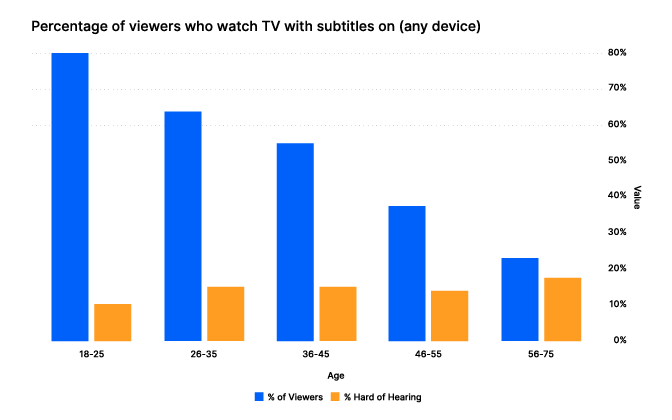
(Source: Kapwing - Younger views, age 18-25, greatly preferred video subtitles even though fewer of these viewers have hearing issues.)
What are the Benefits that Speech-to-Text Technology Can Provide for Captioning?
Online platforms and broadcasters can leverage automatic speech recognition (ASR) systems to generate captions automatically, reducing the need for manual transcription. Here are the six key benefits that speech-to-text technology can provide for captioning:
 Efficiency
By automatically converting spoken words into written text, eliminating the need for manual transcription, and significantly reducing the time and effort required to generate accurate captions, huge efficiency gains can be made.
 Scalability
Enabling the rapid and automated generation of captions for large volumes of content, allows for cost-effective captions that can be applied to numerous videos and broadcasts.
 Real-Time Captioning
This allows for the immediate display of captions during live events or broadcasts, enhancing accessibility for individuals who rely on captions in real-time scenarios.
 Cost Effectiveness
Reducing the need for manual labor, and significantly lowering the overall costs associated with producing accurate and timely captions.
 Accessibility & Inclusivity
Captions ensure that individuals with hearing impairments can access and engage with videos, broadcasts, and other audio-visual content, promoting equal participation and inclusion for all.
 Multilingual Capabilities
Allowing for the creation of captions that cater to diverse global audiences and break down language barriers for enhanced accessibility and understanding.
Using Speech-to-Text Technology to Improve Captioning
Speech-to-text technology has revolutionized captioning, making the process much more cost-effective and efficient. Traditionally, captions were created manually by trained captionists who transcribed the dialogue and synchronized it with the media content. However, advancements in ASR technology have significantly streamlined this process.
Speech-to-text technology has made closed captioning more accessible and scalable. Online platforms and broadcasters can leverage ASR systems to generate captions for their content automatically. This automation allows for faster captioning turnaround times, making it possible to provide captions for a vast amount of media content. Additionally, ASR technology enables real-time captioning for live broadcasts, bringing accessibility to live events such as news broadcasts, sports, and conferences.

Real-time captioning for live events has become more accessible and accurate, thanks to speech-to-text technology. ASR systems can transcribe spoken words almost instantaneously, allowing for real-time captioning alongside live audio content. This feature ensures that individuals with hearing impairments can actively engage with and understand live events.
Automated captioning reduces the dependency on manual labor, resulting in significant cost savings for media platforms and content creators. This cost-effectiveness allows for the captioning of a broader range of content, enabling platforms to make their entire libraries of audio-visual material accessible to all - be it internal teams or people with hearing impairments.
Common Challenges of Using ASR in Captioning
Using ASR in captioning faces common challenges. One key challenge is the accuracy of transcriptions, as ASR systems can struggle with complex vocabulary, accents, background noise, and overlapping speech, resulting in errors and inaccuracies in the generated captions. Additionally, identifying individual speakers can be problematic, particularly in situations with multiple participants or rapid speaker switches.

Other challenges include capturing punctuation, sentence structure, and formatting accurately, which can affect the readability and comprehension of the captions. Real-time performance may suffer from latency issues, causing delays in generating captions that align with the spoken words. Language and domain adaptation can be difficult, as ASR models may struggle to accurately transcribe speech in different languages or specialized fields. Finally, ASR systems may have limitations in understanding context, nuances, and sarcasm, potentially leading to misinterpretations or incorrect captions.
Addressing these challenges involves ongoing improvements in ASR technology, such as fine-tuning models, integrating contextual information, and manual editing or reviewing captions to ensure accuracy and quality.
However, with ongoing advancements in speech recognition algorithms and machine learning techniques, the accuracy of ASR systems continues to improve.
Revolutionizing Captioning in Media Distribution
The advancements in speech-to-text technology have revolutionized captioning in media distribution, making it more efficient, scalable, cost-effective, and inclusive. By leveraging ASR systems, media platforms and content creators can provide universal access to audio-visual content, empowering all individuals to fully engage with and enjoy the rich multimedia experiences offered in today's digital age.
Related Articles
- Use CasesJan 19, 2023
Q&A with Red Bee Media’s Tom Wootton: A First-Hand Account of Speech-to-Text in Media Captioning
 Ricardo Herreros-SymonsChief Strategy Officer
 - TechnicalUpdated: Mar 23, 2026
GPT-4: How Does It Work? Architecture, Training & Capabilities Explained
 John HughesAccuracy Team Lead
 Lawrence AtkinsMachine Learning Engineer
 - ProductDec 18, 2025
Do you really need to pay a fortune for your text-to-speech?
 Stuart WoodDirector, Product

Technical
On-device speech-to-text, in 10 questions
Stuart WoodDirector, Product

Product
Scale more easily with Speechmatics
SpeechmaticsEditorial Team
Use Cases
Tresic selects Speechmatics to power the speech layer of its conversation intelligence platform
SpeechmaticsEditorial Team
![[alt: Illustration representing multilingual code-switching for the Speechmatics Melia 1 speech-to-text model.]](/_next/image?url=https%3A%2F%2Fimages.ctfassets.net%2Fyze1aysi0225%2F2BgLftzAE6cT0uJczif4Cf%2F805533fa6d54351dddd4a4c1f1ba424e%2FMelia-codeswitching-header.webp&w=3840&q=75)
Technical
Melia 1 leads speech-to-text code-switching in Arabic, Mandarin and Tamil
SpeechmaticsEditorial Team
![[alt: Dark grid background with a circular symbol on the left and a pixelated "K" on the right connected by a cyan line.]](/_next/image?url=https%3A%2F%2Fimages.ctfassets.net%2Fyze1aysi0225%2F24PivVEjmscf5DwtdLPn8P%2F36637a2ef67e1e5b16a1560b3ca524b0%2FLiveKit_Inference-Social-dark.webp&w=3840&q=75)
Product
Speechmatics & LiveKit Inference target the accuracy gap that breaks voice agents in production
SpeechmaticsEditorial Team
![[alt: Three blue folders on an orange background, labeled for processing audio files of varying lengths in seconds.]](/_next/image?url=https%3A%2F%2Fimages.ctfassets.net%2Fyze1aysi0225%2F642dhRW3whpEWyQ1OimLTW%2F19aa090e4e0a35f8a0494eb0db84f864%2FMelia-TAT-Social.webp&w=3840&q=75)
Technical
Gone in 20 seconds: Melia outpaces AssemblyAI, ElevenLabs and Soniox
SpeechmaticsEditorial Team