
Ellena ReidMachine Learning Engineer
Training large neural networks requires plenty of time – and plenty of compute. The temptation for many is to speed things up simply by throwing more compute at the problem. But without careful implementation this can do more harm than good. What’s more, most companies don’t own enough GPUs to train these large models on internal infrastructure. Instead, they rely on the cloud.
In this post, we’ll discuss how to turn a single node training setup into a robust, platform agnostic, multinodal one.
The first question we can ask is, how many nodes is too many nodes? To begin, we need to consider when and why training across multiple nodes leads to faster training. Assuming we can fit our entire model on a single GPU (a valid assumption for models up to ~5B parameters on an A100), we can use the extra compute to increase our effective batch size, where
effective_batch_size = local_batch_size * grad_acc_steps * n_gpus_per_node * n_nodes.
If we want to train a model with a batch size of 128, but can only fit a batch size of 4 on an individual GPU, we have 3 choices:
1. Increase the number of gradient accumulation (grad_acc) steps
eg) 128 = 4 * 32 * 1 * 1
2. Increase the number of GPUs per node
eg) 128 = 4 * 4 * 8 * 1
3. Increase the number of nodes
eg) 128 = 4 * 1 * 8 * 4
Algorithmically, the above approaches are equivalent and will produce the same losses. Option 3 will simply get there faster (assuming our network bandwidth is high enough, see below). Notice that we always use the maximum local batch size we can fit in memory, then use the extra compute to decrease the number of gradient accumulation steps.
In Option 3, we’re using 32 GPUs (4 nodes, 8 GPUs per node). At this point, increasing the number of nodes further would be futile, as the number of gradient accumulation steps cannot be decreased further. It is also worth noting that even increasing the effective batch size beyond a certain point (the critical batch size) does not improve convergence; in this regime you gain nothing by increasing the number of nodes further.
Trivial as this may seem, note that varying the number of nodes does not require varying the effective batch size. This point will be crucial in a future post, where we will discuss the use of distributed checkpoints with elastic jobs.
While multinode training may be algorithmically the same as single node training, it poses some engineering challenges. During the backwards pass, the gradients must sync across all nodes. In single node training, GPUs are typically connected via NVLinks/NVSwitches to ensure fast communication. In multi-node training, however, they must communicate over a network. You could simply use ethernet, but this will severely bottleneck your training throughput.
Alternatively, if you use the combination of InfiniBand and RDMA, near linear scaling across nodes can be achieved. Remote Direct Memory Access (RDMA) provides access between the main memory of two computers without involving an operating system, cache, or storage. (InfiniBand both refers to the physical link-layer protocol for InfiniBand networks and the InfiniBand Verbs API - an implementation of RDMA).
While fast, InfiniBand is notoriously fussy about software version compatibility and can be challenging to debug. To address the software versioning issue, we recommend using one of the battle-tested PyTorch containers provided here by NVIDIA.
Make sure you choose a container with the same CUDA drivers installed on the machines. To install additional dependencies, build a simple Dockerfile.

Once the container is built, we recommend converting it into a singularity image:

Notable benefits of singularity images are:
Ease of deployment: no daemon is running as root on each node, a container is simply an executable.
Ability to mount local filesystems or do bind mappings so that file paths on cloud nodes can appear to match local ones.
To execute your training command inside the singularity container simply run:

To address the challenge of debugging networking issues, we highly recommend:
1) Using these bandwidth tests to check InfiniBand is correctly configured.
2) Setting the following environment variables in your python script for more verbose logging.

For more information on environment variables see Pytorch docs and NVIDIA docs.
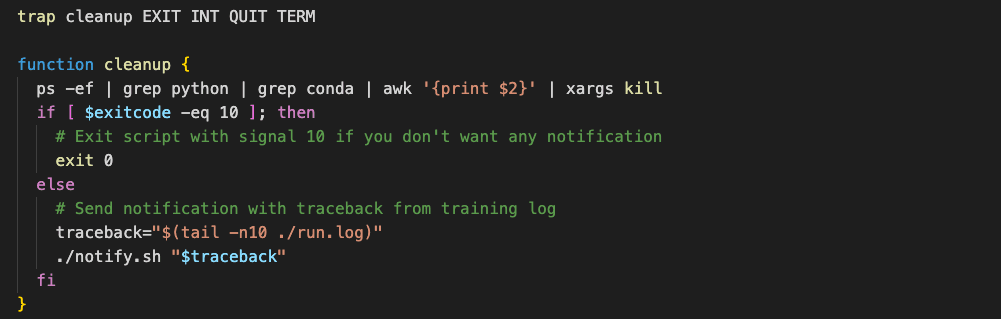
Even with careful implementation, it is unlikely your job will run the first time with no errors. It's important to be notified if errors occur so they can be handled efficiently, and training can be resumed as soon as possible. To achieve this, set up a webhook to send a message if the process exits. Use the trap command in bash to catch signals, then execute a simple function to cleanup hanging processes on the nodes and send an alert.
Today we’ve discussed the motivation for multinode training and how to overcome some of the challenges in implementing it. Specifically, we have seen that networking setup and containerization are critical to performant multinode training. Additionally, we observe that errors can still occur, but robust handling of them can increase the uptime of the training run to 99%.
In a future post, we’ll take an in-depth look at resuming training of a stateful model. We’ll see how distributed checkpoints can be used to pause and resume training smoothly, even across a varying number of GPUs/nodes.
Ellena Reid, Machine Learning Engineer, Speechmatics


![[alt: Healthcare is a strain image]](/_next/image?url=https%3A%2F%2Fimages.ctfassets.net%2Fyze1aysi0225%2F4YLB294PotEnVZFTtksUt8%2F0f9e81fbe24027f52d1941713e032217%2Fmedical_blog_header_general_01.webp&w=3840&q=75)